Monday, 16 July 2012

Living with Linux Desktops: KDE4 V Xfce on Opensuse 12.1

Here is a brief comparison of Xfce desktop and KDE desktop that comes with opensuse linux 12.1. The screen shots for the konsole using top command for memory and system monitor shows the difference. Notable is that KDE Dolphin uses 25MB whereas, Thunar the default file browser for Xfce used 17MB. Half of Dolphin. On CPU and memory Xfce desktop has half resource usage compared to KDE4. I have not used KDE plasma graphics too much on my desktop. KDE4 desktop is configured to use clean looks and use suse look and feel. Having Xfce on an older hardware can make it faster or comparable to a new hardware running latest operating system. 

File Manager
----------------
Dolphin 25MB
Thunar 17MB

Comparison
----------------
          CPU(2cores)      Memory
KDE      6, 3.9%                      0.30 GB / 2.0 GB
Xfce     2, 3.9%                      0.16GB / 2.0 GB

Xfce feels responsive and faster. In fact too fast. The one disadvantage of Xfce is that, sometimes the widgets/panel apps don't work. For example, the window manager had to be started manually at command line. Or the windows did not have close/minimize/maximize buttons. Again, Lock Screen does not seem to invoke any response from Xfce and also resuming after hibernating does not prompt for password by default.

Screens

KDE Top and System Monitor

Xfce Top and System Monitor

Monday, 9 July 2012

Friend Suggestion like Facebook, Google+ or Product Suggestion like Amazon: Implementing for your own web app, site

This is an application of Apache Hadoop MapReduce framework. Facebook has a feature that says that, some people may be your friends. This is calculated based on a number of factors such as common friends, likes, visits to profile,
comments made etc. Basically the interactions is logged, analyzed and put through a kind of weighted matrix analysis and the connections which are above a threshold value are chosen to be shown to the user.

Problem: An input file of 1GB size with the logs of interactions among 26,849 people. To keep the data manageable on my computer, I am creating random logs with interaction of 1000 people with the rest of the people on the, say social
networking site. Gathering and presenting this data to map reduce is itself a job. In our case, these 1000 people need friend suggestions.

Solution: Here this is done in a Single map reduce job although, more data and intermediate jobs can be added in real life. The mapper for the job takes each interaction and emits the user pair and interaction statistics. For example,
Sam Worthington has 1 profile view, 2 friends in common, 3 likes with Stuart Little. so the out put of the mapper here is . We could use the userid across the site rather than a name. For each person interacting with Stuart Little a record like this is produced.

The reducer simply takes the output of the mapper and calculates the sum of the interactions per user-user pair. So, for a week of interactions the record from the reducer may be, for example, . This is got by summing up the interactions by the reducer. Then, each interaction can be given a weight/value then, the number in the record can be multiplied by the weight and summed. Any calculation is ok as long as it give a meaning result based on the interaction types. Then, interactions with a score larger than a threshold can be chosen to be presented to the user when they login.

Other factors like user interests, activities etc can also be accounted for. Here we can simple treat each as a user and emit a record if there is a related activity in user's profile and proceed as usual. The same approach can be applied to ad serving utilizing info from user profile and activity. A Combiner and mutiple jobs can be used to get more details too.

Results: For 1GB, in real life big data approaches > 2TB, of randomly generated log of interactions of 26K+ people with a select 1000, the mapreduce program gave the friend suggestions in 13 mintues on my laptop with a pseudo distributed Hadoop configuration. So, if you have a few tera bytes of data and 10 computers in a cluster you can get the result in say 1.5 hours. Then all that is needed would be to consume the friend suggestions via a regular db / webservice and present it to the user when they log in.

Screen shots of the Map Reduce job run on pseudo distributed Hadoop:

1) Copying the data to Hadoop Distributed File System


2) Running the jobs

3) Status on Hadoop admin interface.

4) Friend Suggestions with statistics.


5) Job code

6) Mapper

7) Reducer

Sunday, 1 July 2012

Apache Hadoop Map Reduce - 1

Hadoop is a map reduce framework that allows for parallel distributed computing. The criteria for adopting Hadoop is that, the same operations are performed on records and records are not modified once created. So Reads are more frequent than write in a traditional relational database system. The advantage of Hadoop or a Map Reduce frame work comes into action when the data is large enough ~ 1TB. Above this point data is referred to as big data approaching PetaB. At such a point it is better to throw multiple machines at the task rather than to use a single machine with parallel programming. The technique used is Map Reduce which deals with Key and value pairs.

A map operation is performed on records whose inputs and outputs are key value pairs themselves. The output is merged, sorted and submitted to a reduce operation which combines and generates the output. For example, we have 12 years of student records for examinations across 15 subjects. The total number of records is 5,700,000. On this data set we can find operations such as highest score on a subject over the years, total failure reported across the year etc. To find the total failures, the map operation outputs a key value pair   every time it encounters a failed exam. The reduce job takes all such key value pairs and emits a Key value pair .

The hadoop standalone configuration on these records finished in ~ 35-40 seconds. The hadoop run start is shown here
 The run end is here
Output is here. 

The same on a pseudo clustered mode gives results for similar operations in ~40 seconds. The difference is that, the input files have to copied into the Hadoop distributed file system and the output needs to be copied/read from the HDFS. As shown here

Saturday, 2 June 2012

Java Concurrency - Beyond Synchronized


Synchronized keyword is frequently used in Java. But, Synchronized cannot provide a method for threads to signal one another of conditions that others may be waiting on. Another thing is that synchronized does not act on a fairness policy. A thread that is starved for quite some time need not get access over others. i.e the fact that you have been waiting for some time may not be considered. 

An example for conditions is availability of elements in a shared data structure queue. Such a facility is provided by java.util.concurrent.locks.Condition. This allows threads to wait for a condition on a lock and relinquish the lock so that, other threads can full fill the condition that is needed for the waiting threads to continue. This logic can be programmed using locks but, Condition provides this off the shelf. Once the lock is acquired thread waits for the condition mandatory for it to continue. When the condition is true it continues. 

Fairness policy is allowed by a Reentrant lock where the thread waiting for quite sometime will get access. 
The intriguing part of threading in Java is that, the time (in ms) between a consumer / producer is able to regain access to a shared data structure is the same with Condition as it is without Condition. 

Example: Producers & consumers waiting on a lock & its condition. Both share a common queue where the producers put in integers for the consumers to take, contending for the queue access at the same time.  

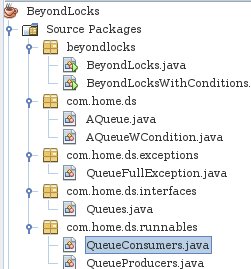
Code Structure

Code with Synchronized keyword.

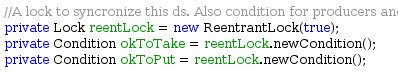
Condition creation code.

Code with Condition.

The consumer comes back on receiving the signal

Monday, 14 May 2012

Facade Pattern - Java Code Architecture

Object oriented programming involves instances of classes i.e objects interacting with one another towards a common goal. This interaction can be for services, control or data. Objects perform a particular function in a software. When there are a lot of objects the code becomes cumbersome to maintain and use; every time in the same piece of software. 

Facade pattern comes into action when you have a subsystem that performs a particular service for another subsystem or part of the code. A subsystem here in terms of software code means a group of objects interacting to get a job done. Facade pattern hides the objects underneath it and their interactions to object layers above the pattern. For example, information collected from the user interface in a java application may be used to create say, a user object, account object and the user interface may store this to the database by using an object that performs that database operation. Here a Facade object can expose an operation, i.e creating the objects from the data from UI and storing it to the database. This facade can be used by the UI without delving into the details of how it is done. 

If the interaction of the objects in the facade changes, it is contained within the facade and no layer of code outside the facade is affected. This is the most important aspect of the facade pattern that makes it so useful in Java Enterprise where this pattern is more frequently seen in popular Java Enterprise IDE's ready-made-code.

For example, suppose there is a table in the database that stores the details of attendees in a conference. Java enterprise wraps this with an Entity say, Attendee entity which would be part of the JPA ready-made-code. This entity will expose the database operations on the table. A facade would be created namely a session facade which exposes operations that are utilised by controller layers to update information.  The session facade will deal with the requests on the Attendee Entity. 

Here is an example of the code structure for a Tomcat based application that gets information in a table. Called from a servlet. i.e servlet is the controller in Model-View-Controller Application model. 

as you can see from this code, the facade is called to do the job. The code to get a job done becomes small as far a controller object is concerned. A lot of things may happen under the facade but, the higher layer object does not care about this. It is the Facade's responsibility. The code structure in eclipse web project is shown below. There are entity objects and Facade objects. Facade objects here share a common ancestor which declares common operations on entity-facades. In this example, entity objects simulate the JPA entity objects.


The abstract facade is not a must in the general facade pattern but, is used here as is further simplifies code with inheritance. A part of abstract facade is shown here 
A subclass of this called Attendee Facade used in our example is here 
A lot of object interactions and code is thus abstracted from a controller object / higher level object by using the Facade Pattern. It also makes the code more reusable, maintainable, predictable and beautiful.

Thursday, 5 April 2012

Skip Lists Algorithm and Runtime Profiling

Skip List Runtime on dictionay operation compared to Splay Trees and Hash Tables. (Coded in Java)

Skip lists are a relatively new data structure. This is an ordered list where the nodes are connected together at multiple levels. Different levels of connected nodes need not be uniform. This allows the skip list to skip items during a search. Each level is an ordered list in itself.  Every node has a level and is connected to different nodes in the same level. This allows data structure operations to skip through the list. Example is the following list where there are two levels.

Level 1 connections                  E ----------> X
Level 0 connections A ->; B -> E -> F -> G->X -> Y -> Z

Level 0 list is the same as a linked list. E has connections has two levels. If a search was for say 'G'. The algorithms is as follows Start at Level 1, X > F so we move down at 'E' and then proceed at level 0 from E till G is found. Nodes A and B were skipped.

SkipList Search Algorithm:
1) Start from the top level proceed until level 0
    a) Move to the right until a node with node Key < search Key
    b) Jump to the next lower level.
2)  If 1a resulted in an exit in level 0, the next node could be the search node. else it is absent.

Here is a skip list implementation holding values A to Z. The nodes encountered during the search for H and M are shown.

Level 2 Skip List. 


Level 6 Skip List
In order for the list to be helpful level at each node needs to be decided at Random during the insert operation of that node. The maximum level that is useful in a skip list is ln N -1 where N is the number of items expected to go into the skip list. 

Algorithm Inserting in to the Skip List

1 Find the node as in search. This will return the node that will be to the left of the new node (L).
   a) While dropping down to the lower levels maintain the nodes in an update List.
2 Create the new node with a random level. 
3 Adjust the pointers from the existing L node to the new node.If the new level is greater than the existing level of the list, then the head of the list should be adjusted to point to the new node at the new level.
4 Set the next pointers of the new node to next pointers of L
5 Set next pointers of L to the new node at that level. This is done for each node where level was changed in step 1.

For example in the case of 
Level 1 connections                  E ----------> X
Level 0 connections A -> B -> E -> G->X -> Y -> Z. We need to insert H with level 3 then, at level 1 we drop down at E and also at G in level 0. So, G->next = H at level 0, E-> next = H at level 1, F -> next = X at level 1 and at level 2 H is linked to head and tail of the list.


Level 2 connections                                  *<-H->*
Level 1 connections                  E ----------->H-> X
Level 0 connections A -> B -> E -> F -> G->H->X -> Y -> Z

Runtime of Skip Lists: Dictionary operations on skip lists take O(Log(n)) time. Finding each new node's level is done in random as follows


Comparison of Skip List, Splay Binary Search Trees and Hash Table

For a serious input of 56000 word dictionary, the search operations on Skip lists, Splay Trees and Hash Table is as follows. Skip list took 40 comparisons at 11 levels to find the word 'Skip' in the dictionary.


Splay tree took less time than the skip list at
Hash Table left the above two way behind in run time

Result: In general skip lists and splay trees can't hold candle to hash tables. 

Wednesday, 4 April 2012

Ant Power : Build Automation


Ant is helpful in any java project involving large number of resources. Ant based on xml and java itself can help to compile java classes, put the classes in a jar or war, create file folders before building projects and interfacing with servers like tomcat to perform application installation. This is useful in java enterprise web applications and enterprise applications. Ant ships with popular IDEs like eclipse and Rational Application Developer.

Ant manual webpage  provides a sample build.xml file that can be customized by developers instead of writing it from scratch. This is a modification of that, file with modifications pertaining to ; building webapps for tomcat 7.0.26. For example a change is the compilations of classes and creating a war using war rather than jar (purpose!). Some changes were needed for tomcat 7.0.26 for example the manager url.

The sample folder structure used for eclipse dynamic web application is shown here.


The project tag is here. Base dir is .. since the ant build.xml is in 'Ant' folder. Multiple ant files can be grouped in this folder in a huge project.

The properties declaration that I use

The compile element with changes

The dist element which creates the distribution war file in the dist folder.

New elements to stop, remove, compile, install and start the web application.
The resulting WAR file contents

Tuesday, 3 April 2012

Java Authentication and Authorization Service JAAS - Java Security- Create a Login


How to create a custom Jaas Login Module?

Java Authentication and Authorization service allows applications to authenticate subjects independant of the underlying authentication mechanism. This is done by standard interfaces defined in the JAAS architecture. Any authentication mechanism that, conforms to these interfaces can be used by the application through JAAS without getting entangled in the fine details of the mechanism. This is typically used when applications need to authenticate subjects using a different mechanism than provided as part of an application framework. For example, custom database lookup to autheticate users rather than FORM authentication in a webapp under tomcat.

The LoginContext allows applications to login and out i.e authenticate(and also authorize). Applications don't interact with the security mechanism that provides the authentication mechanism. It may be a kerberos login or a login mechanism where you deal the user name and password. When you initialise the context you specify the LoginModule_Configuration you will use to login. You also specify the callback handlers which gets the information from the user(or someother place) and puts it in callbacks. Callback has the info needed by application. Callbackhandler implements interfaces which allow the application classes to get the information from the authentication mechanism. While the application is executing the login() method of the underlying
authentication mechanism, the handlers get the credentials and puts them in the callback. In the login() method the call backs can be polled to get the information they have.

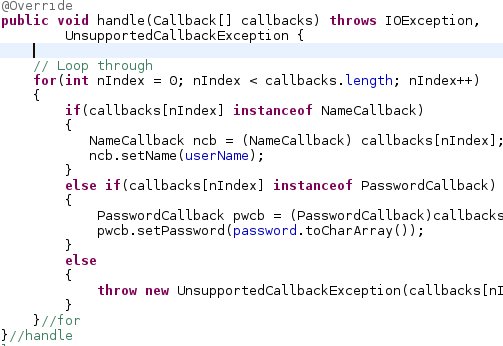
Handler's handle method sample.
Login method in a class that extends LoginModule interface.

Loginmodule is an implementation of the jaas compatible security mechanism that, performs the authentication. A custome module can be coded by implementing the interface.The modules available are specified in a jaas configuration file and that module classes/jars should be available for the application to load.

Jaas configuration file.


You mention the options to be used with a loginmodule in the jaas configuration file. For example, do you want the loginmodule to be a mandatory success thing for applications to go through? requisite? failing ok? you mention the location of the jaas configuration file in  your java.security file. The java.security file is located in your_jre/lib/security/java.security. This is underlying login.config.url.= your_jaas_config_file here. if nothing is mentioned here it will look in you home folder for .java.login.config file. Sometimes a
behaviour noted is that, if you are running as a root user this will be accessed irrespective of anything else!!. This is the case when you run from eclipse as a root user. Simply put, this is the name of the class that implements the LoginModule interface. Standard providers like kerberos do this. You can also implement the
interface and put it here. The name at the top of the {} brackets is the 'name of the login configuration' you will refer to in your application.

Example jaas configuration specification in Java.Security file

Monday, 5 March 2012

Text Search: Boyer Moore Looking Glass Vs Hash

Text Search: a comparison of Boyer Moore Vs Hash. This experiment takes on 2 text search techniques to compare the output.

The first approach is Boyer Moore algorithm using the looking-glass approach. This is ok and has no side effects as a result of the technique used in the algorithm.

Input: A text file of 11,000 lines. The objective is to find the occurrences of a pattern.

Boyer Moore algorithms fares at 49.2 milli seconds.

Now the technique using super imposed coding to speed up the search by Malcolm C Harrison runs into problems and interesting observations when the text involved is English. The technique is to hash every two consecutive letter of every line of the
input to a superimposed code. Now, the same is done to the pattern and we need
to find only the line with the similar bits in the super imposed code.

This is pretty ok for small inputs but, on the huge input this gave a lot of additional outputs without any presence of the pattern in the text. This is mainly because the hashes to a range of 128 on English text is resulting in collisions. Too much that the out put is unusable. The number of collision is of the order of 1000. (10%).

As mentioned by Knuth, this collision can be brought down by removing all the
spaces in the input text and pattern since it contributing to the common noise. This does not help much but does bring the collision down a bit. But, the collision can be reduced to 240-280 collisions by applying the hash incrementally to the text pattern. i.e if 'software' is the term apply the hash to so, sof, soft, etc so that, the
incremental sub sequence is also caught in the superimposed code. This is good
but 200-250 collisions is still not good and not to mention the additional runtime incurred to perform the incremental hash. The time is 482ms.
 
Byer Moore although would take more time on much larger files wins for now.

Wednesday, 15 February 2012

Making Concurrent Software - Finding Concurrency with Lock Striping

In this post we see how planning software code with concurrency will save time.

At the basic level                    Software = Data structures + Algorithms. 
At an advanced level Faster Software = Data structures + Algorithms + Concurrency.

So, we can get more work done in the background or concurrently using multiple threads. But, more threads does not necessarily mean faster software. This is because as more thread are introduced we may be synchronizing the threads using single / multiple thread synchronization mechanisms such as locks. So multiple threads may be waiting on the same lock to do an operation on a data structure. This essentially makes the threads run sequentially. This is the case when ordinary data structures are wrapped using a single lock for thread synchronization in software programming. Not only will this make the data structure become a bottle neck in the performance but also, will introduce synchronization issues with composite operations. 

Most collections in Java concurrent package are thread safe and even employ a method known as lock striping. Lock striping stands for splitting a high contension lock into multiple locks with out adversely affecting the integrity of the protected data. 

An Example for Concurrency using Lock Striping
Problem: A hash table is used by multiple threads to insert and delete items from the hash table. This hash table has the option of lock striping by taking in the number of locks to protect the underlying data intergrity.

Case 1: Using only a single lock to protect the data structure operations. The time to execute 10000 inserts and 10000 deletes from two threads simultaneously takes runt time 7343811 nanotime for the system.

Case2:  Using only 10 lock to protect the data structure operations. i.e every N / 10 of the hashtable entries is protected by one of the 10 locks. The run time for this is 3067498 nanotime for the system. A savings of half the run time when there is only one lock.

The run times for the two cases in Netbeans profiler is shown below. Case 1
2


Lock striping demo shows that, striping can help the threads to wait on locks protecting narrow segments of the data. But, identifying such scenarios, updating and maintaining it can be challenging. Java uses the same technique in concurrency package.  (All coded in Java).