Monday, 5 March 2012

Text Search: Boyer Moore Looking Glass Vs Hash

Text Search: a comparison of Boyer Moore Vs Hash. This experiment takes on 2 text search techniques to compare the output.

The first approach is Boyer Moore algorithm using the looking-glass approach. This is ok and has no side effects as a result of the technique used in the algorithm.

Input: A text file of 11,000 lines. The objective is to find the occurrences of a pattern.

Boyer Moore algorithms fares at 49.2 milli seconds.

Now the technique using super imposed coding to speed up the search by Malcolm C Harrison runs into problems and interesting observations when the text involved is English. The technique is to hash every two consecutive letter of every line of the
input to a superimposed code. Now, the same is done to the pattern and we need
to find only the line with the similar bits in the super imposed code.

This is pretty ok for small inputs but, on the huge input this gave a lot of additional outputs without any presence of the pattern in the text. This is mainly because the hashes to a range of 128 on English text is resulting in collisions. Too much that the out put is unusable. The number of collision is of the order of 1000. (10%).

As mentioned by Knuth, this collision can be brought down by removing all the
spaces in the input text and pattern since it contributing to the common noise. This does not help much but does bring the collision down a bit. But, the collision can be reduced to 240-280 collisions by applying the hash incrementally to the text pattern. i.e if 'software' is the term apply the hash to so, sof, soft, etc so that, the
incremental sub sequence is also caught in the superimposed code. This is good
but 200-250 collisions is still not good and not to mention the additional runtime incurred to perform the incremental hash. The time is 482ms.
 
Byer Moore although would take more time on much larger files wins for now.

Wednesday, 15 February 2012

Making Concurrent Software - Finding Concurrency with Lock Striping

In this post we see how planning software code with concurrency will save time.

At the basic level                    Software = Data structures + Algorithms. 
At an advanced level Faster Software = Data structures + Algorithms + Concurrency.

So, we can get more work done in the background or concurrently using multiple threads. But, more threads does not necessarily mean faster software. This is because as more thread are introduced we may be synchronizing the threads using single / multiple thread synchronization mechanisms such as locks. So multiple threads may be waiting on the same lock to do an operation on a data structure. This essentially makes the threads run sequentially. This is the case when ordinary data structures are wrapped using a single lock for thread synchronization in software programming. Not only will this make the data structure become a bottle neck in the performance but also, will introduce synchronization issues with composite operations. 

Most collections in Java concurrent package are thread safe and even employ a method known as lock striping. Lock striping stands for splitting a high contension lock into multiple locks with out adversely affecting the integrity of the protected data. 

An Example for Concurrency using Lock Striping
Problem: A hash table is used by multiple threads to insert and delete items from the hash table. This hash table has the option of lock striping by taking in the number of locks to protect the underlying data intergrity.

Case 1: Using only a single lock to protect the data structure operations. The time to execute 10000 inserts and 10000 deletes from two threads simultaneously takes runt time 7343811 nanotime for the system.

Case2:  Using only 10 lock to protect the data structure operations. i.e every N / 10 of the hashtable entries is protected by one of the 10 locks. The run time for this is 3067498 nanotime for the system. A savings of half the run time when there is only one lock.

The run times for the two cases in Netbeans profiler is shown below. Case 1
2


Lock striping demo shows that, striping can help the threads to wait on locks protecting narrow segments of the data. But, identifying such scenarios, updating and maintaining it can be challenging. Java uses the same technique in concurrency package.  (All coded in Java).

Thursday, 9 February 2012

How to Code your own Search Engine Like Google, Bing or Yahoo - Part 2. Make the Search Engine run Faster or Better

In one of the previous posts, I coded up a small search engine with tries and the leaf nodes of the tries held the list of documents which had the specific word (path in the trie). The list of documents was maintained as binary search trees because, trees can help in set representation and finding set intersections pretty neat. But, not anymore in the case of search engines when we increase the size of the sets involved. Using binary search trees for the list of documents will utilize more memory for intersection and take more time than a sorted linked list. This is evident from the following profiling snapshots below with large amounts of data. More over search engines use sorted list to find the intersection faster by skipping through non-matching documents. This may seem a bit vague argument but, coding and profiling proves that this is better way.


New Algorithm for Set Intersection of the search engine:
So instead of binary search trees we use a sorted linked list to store the documents for a particular word. This list is sorted on the basis of the id of the documents. So every document
has to have an id. To find the intersection between two lists of documents we follow the algorithm as shown below. 


1. start from the beginning of the two sorted lists A & B


2. if the documents in the current positions of A and B match then we have a document which has both words add the document to the intersection list.


3. otherwise find which list A or B has the smaller document id at the current positions of mismatch.  if it is A then, skip through elements of A until you find a document with id >= current id at B. if it is B then, skip through elements of B until you find a document with id >= current id at A.


4. If you run off the end of any of the lists return the intersection list.


Example


List A 1, 4, 7, 9, 11, 31, 37, 56, 143, 200, 900, 3422
List B 1, 29, 37, 56, 142


Here in this example, we have a match at 1 and a mismatch at the second index. List A has smaller id of 4 compared to 29 of B. So we skip through A until we reach 31. Now, then
case is just the reverse B has 29 and A has 31 so we skip in B to 37. Then we skip in A to 37 a match! ok so the idea is to skip non-matching elements in the lists. We are also saved from having to go through the rest of A.


Run time Performance Profiling of implementing the Set intersection using, (a) Sorted Linked Lists (skipping using linked list iterators), (b) Sorted Linked List indices (age old ++ index for skipping), (c) Splay tree. The difference in the code for cases a and b are trivial in appearance but, is greatly different in efficiency.


Partial code snapshot of iterator based skipping.
Partial code Snapshot of Index ++ skipping


In both the above codes, the bulk of the time is used in "get(n)" type methods for the Java Linked List collection. But, it is far less for the iterator next() method!! This is evident here 


Performance Profiling snap shots for finding intersection of two lists with increasing sizes around the ranges 100, 1000, 10000, 100000, 1000000 in order.


The observation is that, when there are only a few items, skipping / jumping using indices is very fast. But, as we increase both the lists' size we will have to leave the splay tree / binary tree representation at around 10000. This is because getting each item of a tree and then comparing it will cost memory which is saved in both the list based scenarios. More over when two trees have M and N items, we try to find if each of M is similar to any of N. This takes M log N, as M and N are very large this can be bothersome. 


So, we are down with 2 contenders. The performance profiling of indices based skipping gives a shock as we again increase the lists' sizes, the Sorted Linked Lists (skipping using iterators) is way faster than indices (age old ++ index). For example, with a list sizes of 500000 and 150000, the sorted linked list algorithm finds the intersection in 3.45 minutes. Whereas, if we skip using integer indices and getAt(n) methods we get the set intersection in around 20 minutes. Again as mention before iterator Next() seems faster for the Iterator / Java LinkedList as opposed to a getIndex(n) for Lists. 


For multiples sorted lists, we can find the intersection by taking the two smallest lists and finding the set intersection as above. Then doing the same with the next smallest list as so on until we end with only one list. So by using sorted lists for the documents we have, for a given word, we can speed up the set intersection part of our search engine by many order of magnitude. The thing is that, we need to maintain the documents for a particular word in the sorted order. Some housekeeping does help it seems!.

Tuesday, 17 January 2012

Splay tree (Super Search Tree) Vs Binary Search Tree


In one of the earlier posts I had called for the use of binary search trees for set representation and general search operations. I take it back. Now it is splay trees !. These are very similar to binary search trees but, these ones are balanced binary search trees. A binary search tree gives you log(n) of search and insertion theoretically. This is true only of the keys that are going into the tree are totally random. So if the set of keys { 10, 2, 38, 63, 21, 9, 1} go into a binary search tree then, the tree looks like 

This tree gives you log(n) time on its search. It is balanced too. But, if the application was putting in data in not-so random way then the tree can easily become unbalanced. This can lead to n time search. so if keys were to go in like { 1, 2, 9, 10, 21, 38, 63 }. Then the tree looks like
This seems ok with the defenition of the search tree but, if you were searching for 63 then, you need to do 7 comparisons compared to 3 in the previous tree. Also, recently accessed data may be frequently needed. Effectively this will turn into a list. In a splay tree, all operations are similar to a binary search tree but, you bubble up the recently accessed node up to the root or the first level from root. So next time you access it, the node will be available real fast. The bubble up will cost some time but, will compensate over a number of operations with the efficiency of balancing the tree. For splay tree the average of a collection of operations is always of the order of log(n) although some of these operations may be of n time complexity. Accessing a node means searching / inserting / deleting. In all these cases we bubble up the node / the node that replaced it in the case of deletion. 

The process of bubbling up the node consists of left rotations and right rotations. The algorithms to bubble up the node / balance the tree has three conditions.
1) If the node is a right child of a left child then you rotate the node left once and then rotate it right. (vice versa also for this case)
2) If the node is the right child of a right child then, you rotate the parent left once and then the node also once to left. (vice versa also for this case)
3) This has to be done until the node reaches the root or the first level from root.

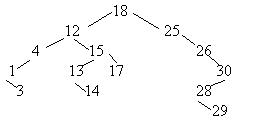
So for a set of keys { 18, 12, 25, 4, 15, 26, 1, 13, 17, 30, 3, 14, 28, 29}  suppose the tree looks like this before any splay. We access 3 in 4 operations. 

For splaying, 3 is the right child of a left child so we rotate it left once and then right again. The left rotation gives a tree like this
Then a right rotation again gives
Again since 3 is the left child of a left child we do right rotations. one at 12 then at 3. This brings 3 to the root.
Next time we do a search for 3 we get a faster response. Also, the tree is better balanced so, we get a better time for any node than before. 

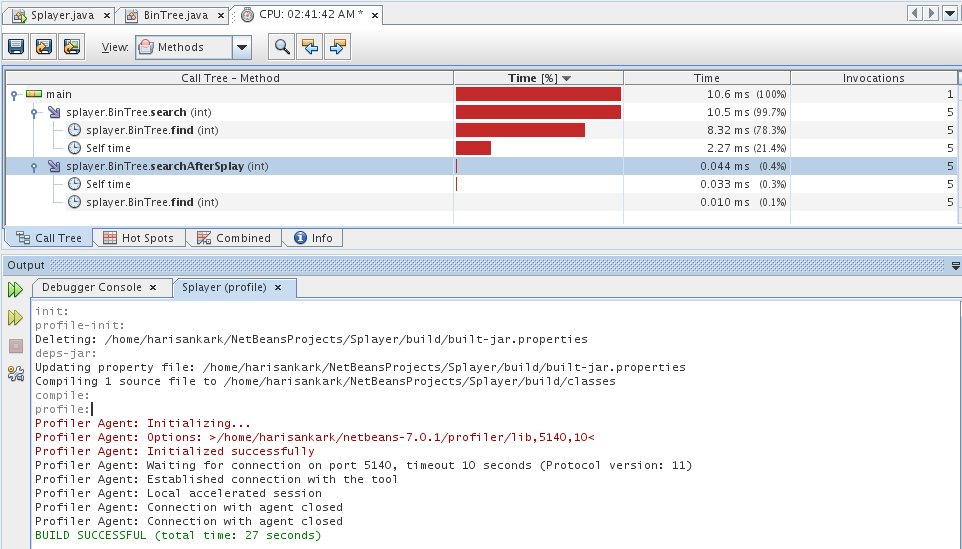
A run time profiling example: Tree is created with values from 0 - 99999 in order. Then 99999 is searched before and after splaying. The cpu runtime profiling results are shown below.

Another profiling result, to get a feel of the advantage, (constructing the same tree as before) 4 values near leaf and 1 value near mid section are searched together. Both before and after splaying. The run time results are shown below. 


Obviously, splay operation has an advantage on an average since, the tree is now balanced and we can find any value in less than  half time than before.

Saturday, 14 January 2012

Code Design for Singleton / Lazy initialization Concurrency

This post is an experiment on the concurrency of the common Singleton design pattern and it memory profiling results. Singleton pattern is commonly used in coding and the objective of Singleton is to make sure that, only a single instance of the class is created. The common design with lazy initialization is present in most code. This is shown below (read with out the synchronized keyword).


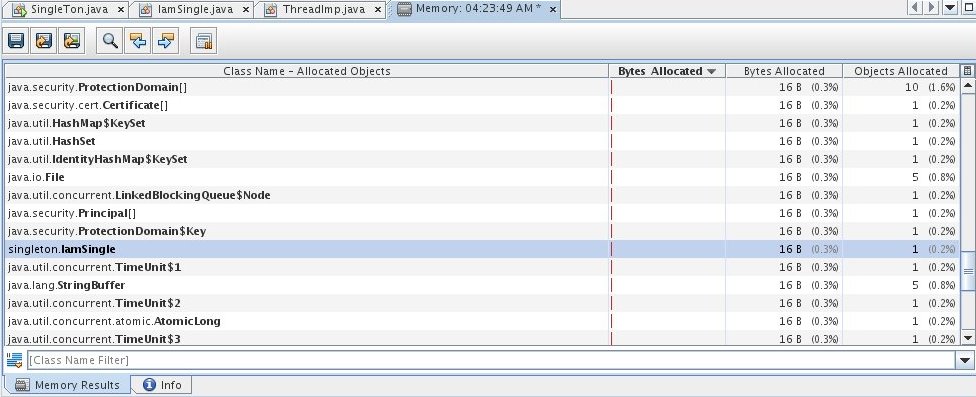
This is fine as long as the code is executed by a single thread. If ever the code is executed by multiple threads, the 'check for null then act' part can result in multiple instances of the singleton class. If one thread A is checking the instance for null, returns true and it is moved out of processor for another thread B, B checks for null creates an instance. A comes back and creates another instance. So there will be 2 instances now as shown  in the run below. The class IamSingle has two instances without the synchronized keyword.


With the Synchronized keyword, the run profile is as follows. There is only one instance. 

This kind of bug can be difficult to reproduce as even getting the wrong scenario depends on the timing of the threads.


Tuesday, 13 December 2011

Classic Longest common subsequence via Dynamic programming

Run time Profiling results of classic longest common subsequence algorithm. 

An example application of this algorithm is finding the difference of two text files. We need to find the longest common subsequence of two sequences. i.e for "bdca" and "bcbda" the longest common subsequence is of length 3 and is  "bda"
The core algorithm using dynamic programming for this is as follows

Lcs(i,j) = {      Lcs(i-1, j-1) + 1 ; if match at i & j.
               Max( Lcs(i-1, j), Lcs(i, j-1) ); if mismatch at i & j
        }

This can be implemented recursively using a two dimensional array m x n where m, n are sequence lengths. For example, two sequences "bdca" and "bcbda" we have the matrix for the algorithm above

0 1 2 3 4

b c b d a
     --------------------------------------
0 b  | 1   1   1   -1   -1 
     |
1 d  | 1   1   1   2   -1
     |
2 c  | -1   2   2   2   -1   
     |
3 a  | -1   -1   -1   -1   3
     --------------------------------------  
   
So here 3 is the length of the longest common subsequence. base on the core algorithm above.
Runtime complexity is about O(mn). This particular basic program yeilds a time as show here

Improvement:

By analysing the recurssion tree of this particular problem there is an improvement that can be made to the runtime. The addition to the core algorithm is as follows

If Lcs(i, j) has not been calculated so far ?

    Lcs(i,j) = { 
                        Lcs(i-1, j-1) + 1 ; if match at i & j.
        Max( Lcs(i-1, j), Lcs(i, j-1) ); if mismatch at i & j
            }

else return the calculated Lcs(i, j);

This small addition saves the code from going to calculate duplicate recursion trees. The time saved (~ 30 ms) is evident here. 

The sample recurssion tree is shown below. There are a lot of repeated duplicate tasks.

     4, 4

   3,4     4, 3

   2, 4, 4,3          3, 3   4, 2   

1, 4 2, 3 .... 2, 3   3,2 .... 3, 2 4,1
     
Reconstruction is based again on the algorithm. We backtrack based on the two steps of the algorithm. ie if match occurred or the Max of sub-problems.

1. We start at the right end of the tree
2. if there was a match at i & j then we take sequence[i] (= sequence[j] as in step 1 of algorithm) and go to (i-1, j-1)
3. else we can go either to (i-1, j) or (i, j-1) in the matrix. The logical thing to do is to go where there is maximum value.
4. if matrix values at  (i-1, j) or (i, j-1) are same we may have to investigate both.

The disadvantage of this approach is that, as the length of the sequences go up the memory for the matrix also goes up as m x n. One way to improve the memory is to use only two rows since we look at only those every time. But, we may need to keep track of which way we step to reconstruct the lcs sequence. 

Wednesday, 7 December 2011

A take on Huffman coding algorithm. How to squeeze data. 133 bytes to 69 bytes.

Problem: Compress data in a text file using huffman encoding algorithm.
Basic approach:  
1 Read the file and build a Huffman encoding tree.
2 Get encoded bit string.
3 Decode and get the original data by walking the Huffman encoding tree.

This method of compression is based on an inefficiency in normal representation of data strings. The inefficiency is that, we use 8 bits to encode a character that appears 1000 times and 8 bits again for a character that appears only once in the input data. So, if we use less number of bits to represent a high frequency character and comparatively more for low frequency character, then we can compress the data. This gives rise to two new issues.

a) The issue then becomes one of knowing the character set or the alphabet of your data in advance inorder to go ahead with this type of encoding. 

b) Encoding the characters as bit sequences can lead to one character being the prefix of another. This can lead decoding program astray. i.e if m is 01101 and e is 011, then we have problem decoding 01101 in out stream since the m might be decoded as an e.

For the time being lets take the ascii character set to address issue a. To deal with issue b we can use a binary tree to represent the encoding. To make sure that, no bit sequnce is  a prefix of another character we use the huffmann algorithm to build the tree. This tree is the huff encoding tree. For example an encoding tree is shown here. 

Input: is a file with the content  
"this is a test file input to huffman encoding algorithm. This will be compressed to a huffmann code. Huffmann encoding tree is used."

The frequency of the characters is calculated as shown here.

Notice that, e occurs 11 times and is encoded with only 3 bits where as b occurs only once and is encoded by 7 bits!. The huffman encodings for the characters are shown here. 

Result: The huffman encoding tree has 45 nodes and the encoded bit stream of the input above is 551 bits ie 68.8 bytes as opposed to the 133 bytes in the input. Bit vector and heap help the encoding tree generation algorithm. But, the tree itself seems to be better of as a pointer based tree as opposed to a array based tree (may not be a balanced tree). This can be pretty handy when sending considerable amounts of data over the network in a software environment.


Tree building algorithm:

1 Read the data from the file.
2 Build a table with the count for each character in your alphabet.
3 Build a huffmann encoding tree based on the frequency of your alphabet.
  a) create leaf nodes with all the characters occuring in the file along with their     
      frequencies.
  b) take two nodes which have the smallest frequencies.
  c) combine these two nodes as the left and right children of a new node.
  d) push the new node into the list with frequency set to the sum of the two child nodes.
4 repeat step three until you end up with one node in the list i.e your root node for the encoding tree.

To encode:
1. Replace each character with the bits encountered while getting to the character form the root of the tree.

To decode:
1 input your stream of encoded bits
2 Until your input is not over
3 for each of the bit encountered 
  a move to the left of the tree if it is a bit 0
  b move to the right of the tree if 1 bit
4 if you have reached the leaf node of the encoding tree, go to the root.

Friday, 28 October 2011

How to Code your own Search Engine Like Google, Bing or Yahoo

This subject of this post has been upgraded with new algorithm for set intersection. Go February 2012 posts for a better solution.


Problem: 
How to code your own search engine like Google or Bing? How to design the search engine? The search engine should give results in run time Order of (length of search key words)
Input: 
100 html files which have a lot of english words in it. Here we focus on the words only. Parsing out the html tags can be done too.
Solution: 
Here I use Trie and Binary Tree data structures to design the core search engine. Data can be extracted from pages and the data structures can be built by another program called crawler. This can be combined with the spell suggestion program in the previous post to make it close to real life. 
Design considerations here:
The design for the search engine is shown below. The tries as explained in the previous post gives search results in the Order of length of key words. Here we have two words "search " and "engine". The trie has paths for each of these search terms and end in a list of HTML files that have these search terms in them. This list is maintained as a binary search tree. This makes it to find the set intersection of the files which have both the search terms! Any data structure that efficiently finds set intersection can be used.


Working:
1) Crawl the files. Take the words from the files and add them to the trie. At the trie leaf node set the list of files in a binary tree. 
2) Input the search terms.
3) For each term retrieve the set of files. Here it is available as binary search trees at the leaf nodes. Since we use a trie, for any number of files, I get the set of files for any given word proportional to the length of the search key word.
4) Find the set intersection of these and display to the user. Here a binary search tree is used to represent sets. Any set representation can be as long as the process of finding set intersection is done efficiently.


The following screen shot shows the search engine in action for the key words, "search", "engine" and "search engine"


The run-time:
To find a single word is around 39 microseconds on my computer using the netbeans profiler (as the trie in the previous blog post). The run time for my search engine is shown below. The search took only 62 microseconds. Now that is how Google is fast. As long as your search data structure and set data structure is chosen correct, you can have it as fast as Google or Bing. Plus you can add additional meta data such for paid pages, relevance to terms, page rank etc and make it better. As for memory you can use a better trie as mentioned in the previous post. 

Tuesday, 25 October 2011

Spell Suggestion Like Google / Microsoft Word

Problem: 

To implement a spell suggestion program similar to the one you see on Google search box, Microsoft Word and the like. English Language dictionary is used.

Solution / Approach: 

Algorithm uses a trie to store your keys. Walk through the trie with the user to find the suggestions. An alternative approach is use word edits and employ the spell checker in a previous post. 

Input: A english dictionary of 59000 words.

Advantages: Search for a Key is very fast. Suggestions can be found in good time too.

Disadvantages: 

The size of the trie can be a limiting factor. But, more than one trie compression technique is available especially for English. But, for this experiment I was focussing on run-time with the first implementation only.

Theory: 

Trie is a M-ary tree. An indexing operation is done at each node of the tree. The indices are the characters of the search Key. Suppose there are k possible character values for key. In English a-z  + unique marker gives 27. Then each node of the trie has k+1 pointers one for each characters possible at that node. This is similar to the way we search for a word in the dictionary. For example, the word "alpha" is looked up by  looking up character "a" then within that, lookup "l" and so on. You can have the pages of all words beginning with "al". In a trie lookup the first character of the key at the root. Then, follow the pointer in the table corresponding to that character. For the word list the number of nodes in the Trie is 143699 ! The word list is by no means compact / processed for that matter. 

Searching an item simply follows characters in the key through the tree and if you have exhausted the key, you have a hit or a miss. Inserting Keys is simple as in searching, you add nodes when you have a miss for the key values.

In a trie, you search in O(length of the Key). The snapshots speak for themselves on this.     


On the other hand the memory requirement for the basic trie is high. If there are n nodes, then there are n * (k + 1) pointers. The two variations that can be used are 

1) Linked list for Pointers in nodes as most of the table is empty in a Trie for English. The trie using the linked list is a de la Briandais Trie. 

2) Then there is Practical Algorithm To Retrieve Information Coded In Alphanumeric. Patricia Tries! Here, the algorithms for building and maintaining the tree will change since we have to store the keys too.

3) Tries can also be represented as two dimensional arrays without the key values being stored in the table. This can save quite a bit compared to basic trie. 

Experiment:

The run of the java program in NetBeans profiler is here. This is for a small word.


For a really long word the time is bit more as shown in profiler.


Suggestions example runs. The algorithm follows from where the user strayed. Although this throws up more suggestions, it works.

Tuesday, 2 August 2011

Beginning Java Security on Android

Android provides all of the java security libraries in Java. Android provides cipher engine classes, Keystore, algorithms, public key cryptography, key generators and the like. The list of algorithms that are supported seems as in the java language updates. Some searching and trials may be needed on this. This is true for the simulator that comes with the android devices too. 


One difference is that, while the default security provider for java on desktops is SunJCE the one on android is bouncycastle. So the default keystore type is BKS rather than JKS. This was not so obvious at first but, a few trials showed that, the keystore was BKS and you can also have PKCS12 keystore. The rest is all the same except that, if you create a PKCS12 keystore you need to store an entry as a PKCS12 type/stream otherwise you get an exception asking for a PKCS12 type. 


Also, If the keystore path has a '.' anywhere in the path, storing the keystore throws exception. So if you stor your keystore at a location with your 'package folder' name for example 'com.myapp' it may result in exception. Removing the '.' character from the path name avoided this.

Monday, 1 August 2011

Encrypting Text Editor Crystal v 1.0 for Android

About the application


In the past few weeks I put together an android application which is similar to Crystal in my old blog post. This application allows the user to store text data on an android device by encrypting it. Crystal v 1.0 for android uses java security libraries available on android sdk. Crystal allows you to create a master password for your data files. Once you set your master password, you can write files using crystal and save them in encrypted form and read them later with your master password. 


Crystal v 1.0 for android apk file is here . You will need a third party application to install it on your android phone. (Until I get my android market account set properly !)


    Welcome Screen
     
 More screen shots and how to use crystal is here 


Current limitations
1) Your master password is immutable.
2) Crystal Selects the location for files on your device automatically.
3) AES is the only algorithm supported in the current version.

How it works
Crystal uses java security on android to create a master keystore on your device. This key store holds your key which is used to encrypt/decrypt your data files. The keystore has a password which is the master password. You set this password while using the application and it automatically generates a symmetric key and stores it in your keystore.  The master password is never stored anywhere on your device. Your key is also safe as long as you keep your master password.

Saturday, 16 July 2011

Android User Interface Part 2

To build a compound control as shown below.
As in the previous post the steps are to 
1) Define the layout in xml.
2) Define a class to represent the layout in code.
3) Inflate the layout in code.
4) Set it to an activity.
The xml layout.
-------------------
The difference is in the attributes that are specified on the xml layout that allows the buttons or any other view to take up enough space as we need it to.
The layout specifies a editview, a list view and two buttons. The two buttons have their width set to 0 dip. The table row which has the button has a collective weight sum of 2. Each of the buttons has a weight of 1. So they occupy half the width each.
The layout class
-------------------
This is similar to the class in the previous blog but, here it is sub-classed from tablelayout. The rest is same.
Using this in an activity
----------------------------
This is also the same as in previous post. Insatntiate a class of the layout just created with the activity as the context. Set it to the activity using 'setContentView' method. The method also shows how to use the arrayadapter to set values to a listview.
The advantage of using the xml layout is that, once it is defined and represented in a layout sub-class it can be used at multiple application activities on the run.

Android User Interface: Using Xml layout resources Part 1

Problem: Getting a layout in xml, to bring it up on an activity. 


In android Views are widgets or controls like textviews, buttons, lists and the like. Activity is what you see on the screen i.e your window or frame that is to be displayed. Layout is how you arrange / position your views on the screen. This is similar to java layouts.


Solution:


The first thing to do is to get your layout defined in an xml layout resource. This can easily be done by using the tools in eclispe for android development. Either you define the xml as shown below in hand or you can use the graphical editor. 


In the xml file below, there is a textview that acts as a banner and a listview. The attributes of the views are mostly straight forward. We can get more control over the views using these attributes. For the time being we focus on getting this xml layout on the screen.
The second step is to represent layout in code using a class which is subclassed from android.widget.LinearLayout. We will use this class in code to build the layout and the views in it (inflate) at runtime. 


(i) Define a class that extends from android.widget.LinearLayout
(ii) Define fields in the class for the textview and listview. For an instance of    this layout class we will get the corresponding view objects into these.
(iii) Override the Constructor for the view, place a call to the super class constructor. Now we add the code to inflate the xml layout. 
(iv) Inflating the layout is done using a system service in android called layout inflator service. Once we inflate the layout we get a reference to the textview and the listview of this layout by calling the findViewById method.


So far the layout is there to be used on an activity. To use this layout class in an activity,


(i) Declare this layout object in your activity.
(ii) In the onCreate method of this activity create the layout object using the current activity as context.
(iii) Set the layout using the 'setContentView' method.


You can set some values for the text view and the list view after this or in the layout class itself. Here an arrayadapter is used to set values to the listview. 


The advantage of using the xml layout is that, you dont build the layout in code and keep you user interface decoupled from the code. When the layout inflator inflates the layout, it can determine the best by using the xml attributes.


** Note:  Never forget to list your own new activities into the android manifest.